
777DX Game Download Free Earning APK For Android (2K27)
777DX.comUpdated
23 November 2026Size
10 MBVersion
v9.0.8Requirements
Android and iosDownloads
30000+Get it on

Description
The 777DX Game is an online gaming platform where users can explore different entertainment options through a mobile-friendly interface. For new visitors, understanding how the platform works is a useful first step before creating an account or exploring its available sections. The layout, game categories, and account options can influence how easily someone finds what they are looking for. Instead of jumping straight into gameplay, users should take a little time to review the available features and learn where the main options are located. This makes the first visit easier to understand, especially for people who are trying an online gaming platform for the first time.
Another important part of exploring the 777DX Game is knowing how to use its features responsibly. Users should check the registration requirements, review the account settings, and understand the rules that apply to each activity. If the platform offers deposit or withdrawal options, it is sensible to read the relevant terms before making any financial transaction. App compatibility and account security are also worth checking before getting started. This guide will explain the main aspects of the 777DX Game, including its features, account setup, login process, available activities, and other useful details to help readers make informed decisions.
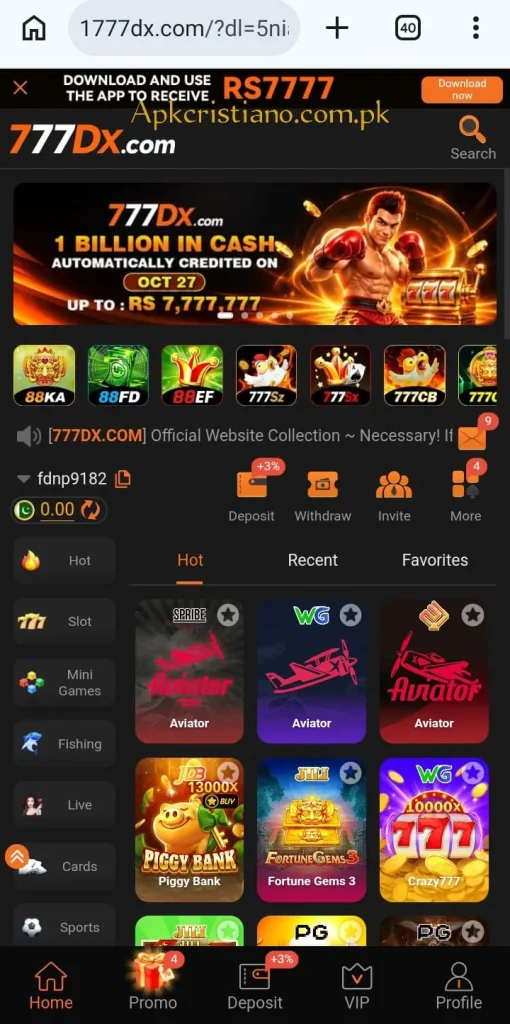
Closer review of 777DX Game
| Features | Details |
| Game Name | 777DX Game |
| Version | Latest Version |
| Updates | Daily base |
| Deposit and Withdrawal Methods | EasyPaisa and JazzCash |
| Language Support | Urdu and English |
What Is 777DX Game?
777DX Game is an online gaming platform that allows users to explore different game options from a single interface. It is designed for people who prefer accessing gaming activities on their mobile devices without dealing with a complicated layout. Users can look through the available sections, check the options provided, and learn how different parts of the platform work. The overall experience depends on the games, features, and services currently available to each user. Discover the Seven Game platform, explore its gaming options, learn about available rewards, and follow our simple guides to understand its main features and account facilities.
For beginners, it is helpful to understand the platform before signing up. The 777DX Game may include account registration, login settings, game categories, and other tools depending on its current version. Users should review the official instructions and applicable terms rather than assuming every feature works in a particular way. If real-money gaming or deposits are involved, remember that results are not guaranteed and losses are possible. Always check the platform’s legitimacy, protect your personal information, and set a spending limit before participating.
Core Features of 777DX Game
- Simple User Interface
- Multiple Gaming Options
- Mobile-Friendly Access
- Quick Account Registration
- Easy Login Process
- Personal Account Settings
- Game Instructions
- Deposit and Withdrawal Options
- Account Security
- Responsible Gaming Controls
How to Get the 777DX Game APK
Users who want to access the 777DX Game on an Android phone should first check whether an official APK file is available. Follow these steps to download and prepare the application:
- Open your mobile browser, such as Chrome.
- Visit the official 777DX Game website, if available.
- Find the APK download option on the homepage.
- Tap the download button to get the installation file.
- Wait until the APK file finishes downloading.
- Open your phone’s Downloads folder.
- Tap the downloaded APK file to begin installation.
- If Android displays a security warning, review the file source before allowing installation.
- Follow the on-screen instructions to complete the process.
- Open the application and check whether it works properly.
Game Categories in 777DX Game
777DX Game offers different gaming categories for users with different interests. Here are some common types of activities users can look for:
- Slot Games
- Lucky Spin Games
- Card Games
- Table Games
- Fishing Games
- Arcade Games
- Sports Games
- Lottery Games
- Number Prediction Games
- Crash Games
- Puzzle Games
- Dice Games
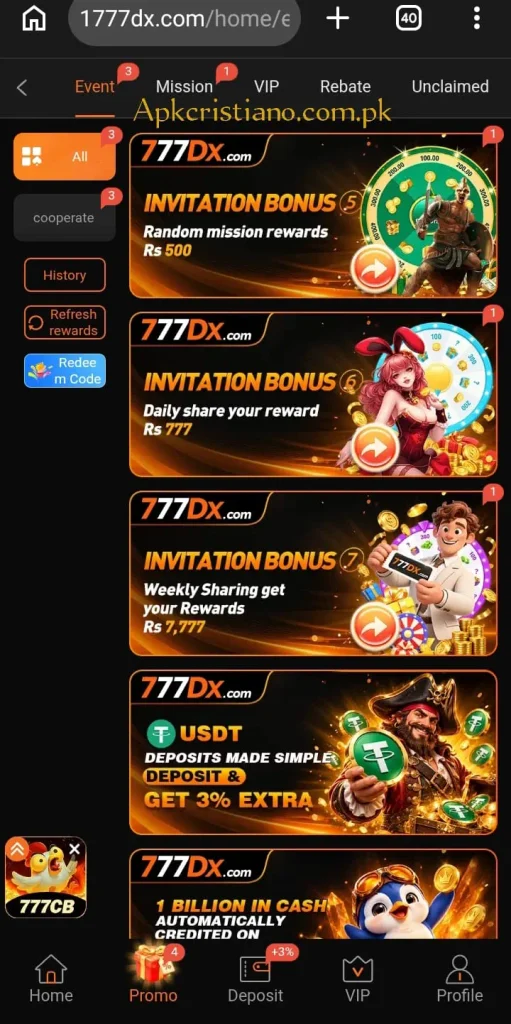
Bonuses and Rewards in 777DX Game
The 777DX Game provides different promotional offers and reward activities for its users. Here are some bonuses and reward options to explore:
1. Invitation Bonus: Users may receive a reward for inviting friends through an available referral or invitation system.
2. Random Mission Rewards: Complete selected missions for a chance to receive random rewards, with prizes advertised up to Rs. 500.
3. App Download Bonus: A special app download promotion was advertised with prizes distributed on November 7. Users should check the applicable offer details.
4. Mystery Treasure: Explore the mystery treasure section to discover possible surprise rewards.
5. VIP Members: Eligible users may get access to special privileges or promotional offers through a VIP membership system.
6. Deposit Bonus: Some promotions may provide additional benefits to eligible users who make a qualifying deposit.
7. Daily Check-In Reward: Check the app regularly to see whether a daily attendance or login reward is available.
8. Special Promotional Offers: Keep an eye on limited-time campaigns that may introduce different rewards and participation conditions.
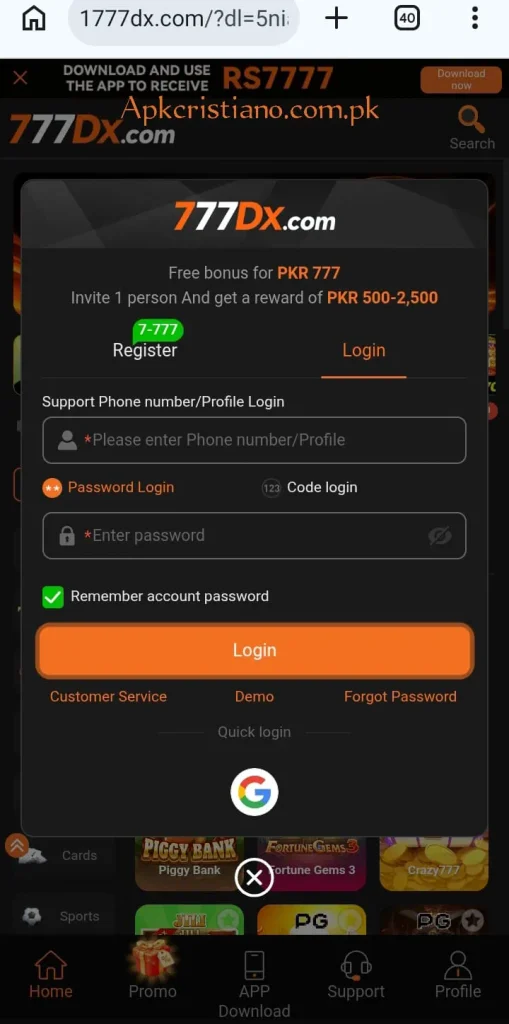
How to Login to 777DX Game
- Open the 777DX Game application.
- Tap the Login button.
- Choose the login method.
- Enter your registered mobile number or login code.
- Enter your account password or required verification code.
- Check your information carefully.
- Tap the Login button.
- Complete verification if requested.
- Access your account dashboard.
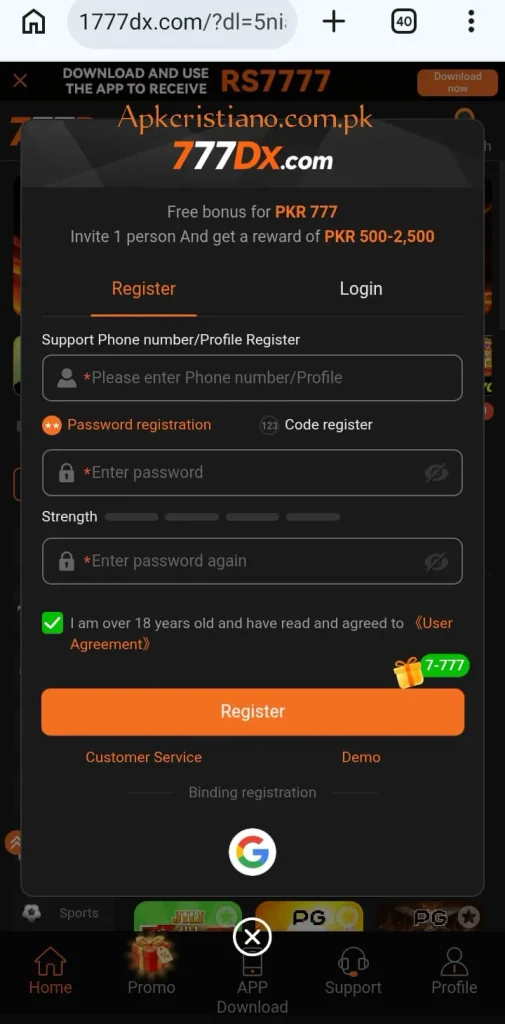
How to Register an Account on 777DX Game
- Open the 777DX Game application.
- Select the Register option.
- Choose registration through a mobile number or code option.
- Enter your mobile number or required code.
- Create a secure account password.
- Confirm your password if requested.
- Add an invitation code if available.
- Complete the verification process.
- Accept the applicable terms and conditions.
- Tap the Register button.
- Wait for registration confirmation.
- Log in to your newly created account.
My Personal Experience with 777DX Game
My experience with the 777DX Game was a mix of exploring its different sections and understanding how its features work. When I first opened the platform, I spent some time checking the homepage, account options, and available game categories. The interface was reasonably easy to explore, and I could find the main sections without much difficulty. I also noticed that having both mobile number and code-based options can make account access more flexible, depending on the available version.
Another thing I checked was the bonuses and promotional section. It included options such as invitation rewards, random missions, mystery treasure, and deposit promotions. However, I would not recommend joining only because of these offers. Users should carefully read the conditions before participating and should not assume that every advertised reward is guaranteed. I would also suggest checking the withdrawal rules, protecting your account details, and avoiding unnecessary deposits. Overall, my experience was mainly about exploring the platform and understanding its features rather than treating it as a reliable way to earn money.
Common 777DX Game Problems and Their Solutions
While using the 777DX Game, some users may face small issues related to account access, installation, or app performance. Here are common problems and practical ways to handle them.
Common Problems and Their Solutions
| Common Problems | Possible Solutions |
| App Not Installing | Check your Android version and available storage space. |
| Login Failed | Recheck your mobile number, code, and password. |
| Registration Error | Make sure all required fields are completed correctly. |
| Verification Code Not Received | Check your network connection and wait before requesting another code. |
| App Keeps Crashing | Restart your phone and check for an updated version. |
| Forgotten Password | Use the official password recovery option. |
| Game Not Loading | Switch to a stable internet connection and reopen the app. |
| Deposit Not Showing | Keep your transaction receipt and contact official support. |
| Withdrawal Delayed | Review the withdrawal conditions and contact support if necessary. |
| Invitation Code Not Working | Check the code for typing mistakes and confirm its validity. |
| Account Temporarily Locked | Follow the official account recovery instructions. |
| App Running Slowly | Close unnecessary background applications and clear the app cache. |
How to Deposit Money in 777DX Game
Users who want to add funds to their 777DX Game account can use JazzCash and Easypaisa, which are supported
- Open the 777DX Game application.
- Log in to your account.
- Visit the Deposit section.
- Select JazzCash or Easypaisa as your payment method.
- Enter the amount you want to deposit.
- Provide the required payment details.
- Check the entered information carefully.
- Follow the payment instructions displayed on the screen.
- Complete the transaction through your selected wallet.
- Keep the transaction receipt for your records.
- Check your account balance after payment confirmation.
How to Withdraw Money from 777DX Game
Withdrawal facilities are available; users may be able to request payments through JazzCash or Easypaisa. Follow these general steps:
- Open the 777DX Game application.
- Log in using your registered account details.
- Navigate to the Withdrawal section.
- Select JazzCash or Easypaisa.
- Enter your registered wallet number.
- Provide your account holder name if requested.
- Enter the withdrawal amount.
- Set or enter your withdrawal security password, if required.
- Review all payment information carefully.
- Tap the Confirm button to submit your request.
- Wait for the transaction status to update.
- Check your JazzCash or Easypaisa wallet for payment confirmation.
Frequently Asked Questions (FAQs)
1. What is 777DX Game?
777DX Game is an online gaming platform where users can explore different gaming categories and account features.
2. Is 777DX Game available for Android users?
Users can check the available Android APK version through the platform’s official download source.
3. How can I create a new 777DX Game account?
Open the application, select Register, and follow the available mobile number or code-based registration process.
4. Can I log in to 777DX Game using a code?
Yes, if the current version supports code-based login, users can select that option instead of entering their mobile number.
5. Does 777DX Game offer bonuses?
The platform may display invitation bonuses, mystery treasure, random mission rewards, and other promotional offers.
6. Can I use JazzCash and Easypaisa on 777DX Game?
These payment methods may be available, but users should confirm their availability in the current payment section.
7. What should I do if my withdrawal is delayed?
Check your transaction status, review the withdrawal conditions, and contact the platform’s official support.
8. Is 777DX Game suitable for beginners?
Beginners can explore its interface and available options, but they should understand the rules and possible financial risks before participating.
Final Thoughts
The 777DX Game offers different gaming categories and account features that users can explore through its mobile-based platform. From registration and login options to promotional activities and payment sections, there are several things that new visitors may want to understand before getting started. Its different sections give users an opportunity to explore the available activities according to their interests.
However, users should not make decisions based only on attractive bonuses or promotional messages. Before installing the APK, check its source, review the platform’s terms, and understand the payment and withdrawal conditions. Keep your personal information protected and never spend money you cannot afford to lose. Overall, take time to understand the 777DX Game and make responsible decisions rather than expecting guaranteed rewards or income.