
88KA Game Download: Latest Pakistani (Cards and Slots APP)
88ka.comUpdated
DailySize
33 MBVersion
v1.9Requirements
Android 5+ and IOSDownloads
77000+Get it on

Description
Online gaming platforms are attracting attention among users who enjoy exploring mobile entertainment options. Many people look for applications that provide convenient access, simple navigation, and different gaming categories. 88KA Game is one of the names that users may come across when searching for online gaming options in Pakistan.
Before exploring any gaming platform, it is important to understand its general features and working process. Beginners usually want to know how to access the application, create an account, and navigate its main sections. Having basic information about these processes can help users make more informed decisions.
In this article, we will discuss the main features, available gaming categories, download and installation process, registration, and login instructions. We will also cover payment-related information, promotional offers, security considerations, and common problems. If you are interested in exploring another platform, you can also read our guide to Milwin Game to learn about its features and gameplay. This guide aims to explain the important details in simple English without making unrealistic promises about online gaming.
What Is 88KA Game?
88KA Game is a name associated with online gaming searches, particularly among users exploring mobile entertainment platforms. People interested in this type of application generally look for information about its interface, account options, and available gaming categories. Understanding these basic details can help beginners become familiar with the platform before accessing it.
Like other online gaming platforms, its actual features and services should be checked through a verified source. Users should confirm the developer’s information, website authenticity, and application details before downloading any APK file. It is also important to review the available terms and conditions, especially when an application involves financial transactions.
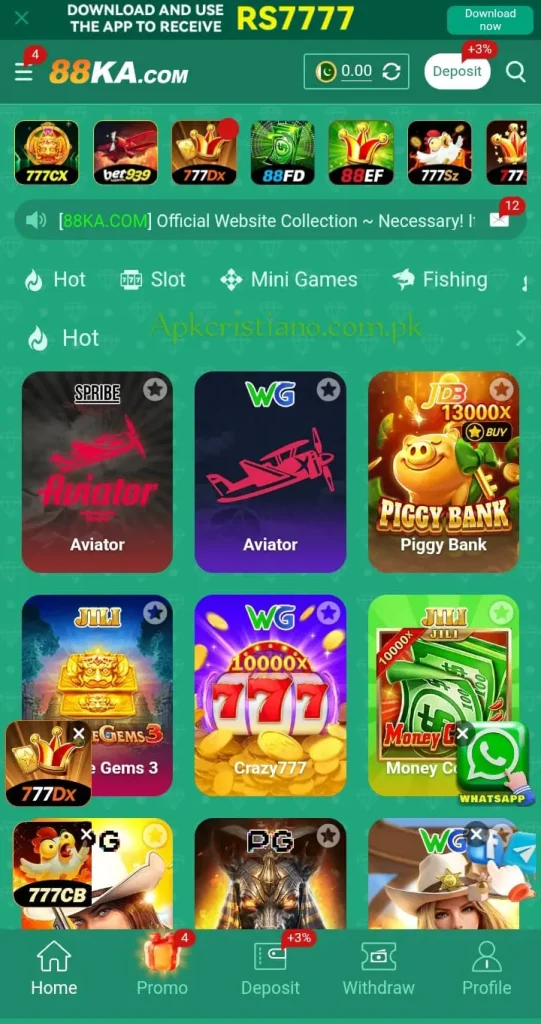
Main Key Features of 88KA Game
The features of a gaming platform help users understand its interface and the options it may provide. Here are eight important areas worth exploring.
Simple User Interface
A simple interface can make an application easier to understand, especially for beginners. Clearly arranged menus and readable options help users explore different sections without unnecessary confusion. A well-organized dashboard can also make account navigation more convenient. Users should still check the actual application before assuming that every advertised feature is available.
Mobile-Friendly Accessibility
Mobile accessibility is important for users who prefer exploring entertainment platforms through smartphones. A responsive layout can adjust according to different screen sizes and make browsing more comfortable. Users can check the available menus and account sections without needing a desktop computer. Device compatibility should always be confirmed before installation.
Different Gaming Categories
Gaming categories help users understand the types of entertainment available on a platform. Depending on the verified version, different sections may be displayed through the main dashboard. Players should explore the available options and read their rules before participating. The actual selection can change, so it is better to check the current platform information.
Account Management Options
Account management tools help users review and control their personal profiles. These options may include profile information, password settings, verification details, and account history. Keeping account information secure is important for regular access. Users should never share their login details with unknown individuals.
Easy Navigation System
A clear navigation system makes it easier to move between different application sections. Users can find important options through properly arranged menus and visible labels. This can be particularly useful for beginners who are accessing the platform for the first time. Reviewing the available settings can also help users understand how the application works.
Promotional Information
Some online gaming platforms display promotional banners, special campaigns, or welcome offers. These announcements may attract attention, but users should understand the conditions before accepting them. Eligibility requirements, expiry dates, and withdrawal restrictions can vary. Never consider promotional rewards as guaranteed money or winnings.
Account Activity Records
Account activity records can help users review information about their previous activities. Depending on the available features, these sections may contain account updates or transaction history. Checking records regularly is a useful habit for identifying unfamiliar activity. Users should keep relevant payment receipts whenever financial transactions are involved.
Customer Support Information
Customer support can help users understand common account-related issues. Beginners may need assistance with registration, login difficulties, or general application information. Before contacting anyone, verify that the support channel belongs to the actual platform operator. Never share passwords, OTPs, or sensitive banking information with unknown agents.
Latest Updated Features of 88KA Game
Application updates can introduce changes to the interface, account settings, and general browsing experience. However, users should always verify the current version instead of relying on unconfirmed advertisements.
Updated Interface Design
New application releases may introduce changes to the dashboard and menu arrangement. These improvements can make important sections easier to locate. Users should review the available layout after installing a verified version. A professional design alone does not prove that an application is trustworthy.
Improved Navigation Experience
Navigation improvements can make it more convenient to explore different sections. Clearly arranged menus help users understand where account settings and other options are located. This can save time for beginners who are still learning the application. The actual interface should be checked before using any account-related feature.
Account Security Options
Account security is an important consideration for online users. Available security settings may include password management and additional verification options. Users should create strong passwords and avoid using the same credentials across multiple platforms. Verification codes should always remain private.
Updated Gaming Sections
Gaming platforms may change their categories or introduce additional entertainment options over time. These changes can give users different sections to explore. However, the actual availability depends on the current version and operator. Read the rules and conditions before participating in any activity.
Performance Improvements
Application updates sometimes include technical improvements related to loading and general performance. A responsive interface can make browsing more comfortable on compatible devices. Users should also maintain sufficient storage space and update their Android operating system. Downloading unofficial update files should always be avoided.
Promotional Updates
Promotional sections may display information about new campaigns or special offers. Each promotion can have separate eligibility conditions and restrictions. Users should read the complete terms before accepting any offer. Never deposit money only because an advertisement promises a reward.
Account History Options
Account history sections can help users review their previous activities and available records. Depending on the platform, these details may include account changes or transaction information. Reviewing this section regularly can help users notice unfamiliar activity. Save important records for future reference.
Help and Support Access
Some application updates may change the arrangement of help sections and support information. Clear instructions can make it easier to understand common account problems. Users should always verify the contact information before requesting assistance. Avoid unofficial individuals who promise guaranteed account recovery.
How to Download and Install 88KA Game
Users who want to access the platform through an Android smartphone should first check whether a genuine application is available. If a verified APK is provided, the following steps explain the general download and installation process.
Step 1: Visit the Verified Website
Open your preferred mobile browser and visit the platform’s verified website. Check the website address carefully before proceeding. Avoid suspicious links shared through unknown messages or advertisements.
Step 2: Find the Download Option
Look for the Android download section, if one is officially available. Review the application name and developer information before selecting the download option. Make sure the file comes from a trustworthy source.
Step 3: Download the APK File
Tap the download option to save the installation file to your smartphone. Wait until the downloading process is complete. Do not open unexpected files or APKs from unfamiliar websites.
Step 4: Locate the Downloaded File
Open your phone’s Downloads folder and find the saved APK file. Check its name and source before continuing. If anything appears suspicious, delete the file rather than installing it.
Step 5: Review Installation Permissions
Tap the verified APK file and review the Android security notification. Allow installation from that source only when you have independently verified it. Avoid granting unnecessary permissions to unfamiliar applications.
Step 6: Complete the Installation
Follow the instructions displayed on your smartphone to complete the process. Once installed, open the application and review its available settings. Disable permission for unknown-source installations afterward if it is no longer required.
How to Register and Login 88KA Game
Registration and login are the basic steps users may need to understand before accessing account-based features. If a verified version supports account creation, follow the instructions below.
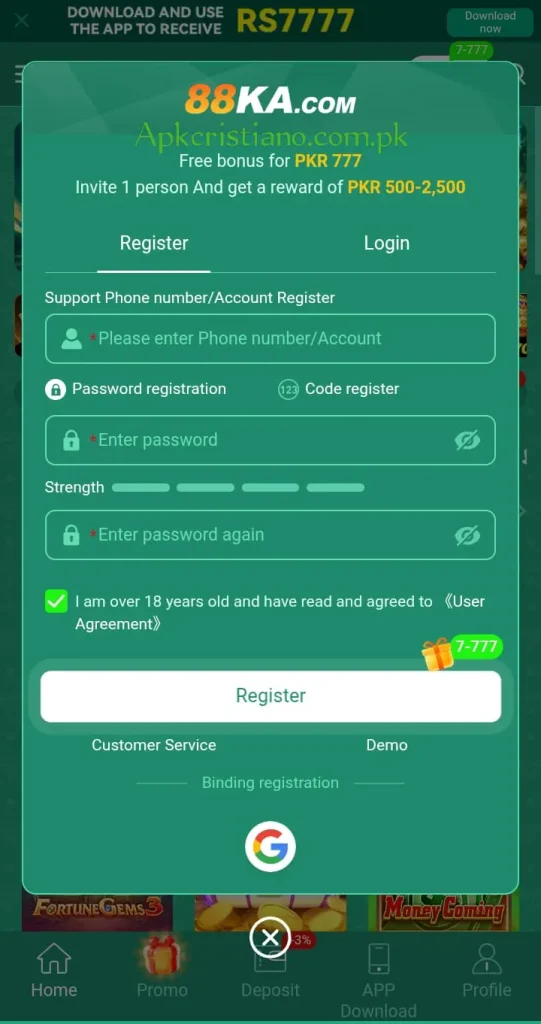
How to Register an Account
Step 1: Open the Verified Platform
Visit the verified website or open the genuine application on your Android device. Check that you are using the correct platform before entering personal details.
Step 2: Select the Registration Option
Find the Register or Sign Up button on the main screen. Tap it to open the account creation form, if registration is available.
Step 3: Enter Required Information
Provide only the information requested by the legitimate registration form. Make sure the details are accurate and avoid submitting unnecessary personal information.
Step 4: Create a Strong Password
Choose a unique password that is difficult to guess. Avoid using common combinations or personal details that others may easily know.
Step 5: Complete Verification
If the platform requires mobile or email verification, follow the instructions provided through its verification system. Never share your OTP with another person.
Step 6: Submit Your Registration
Review the entered information and read the available terms and conditions. Submit the form if you understand and agree with the requirements.
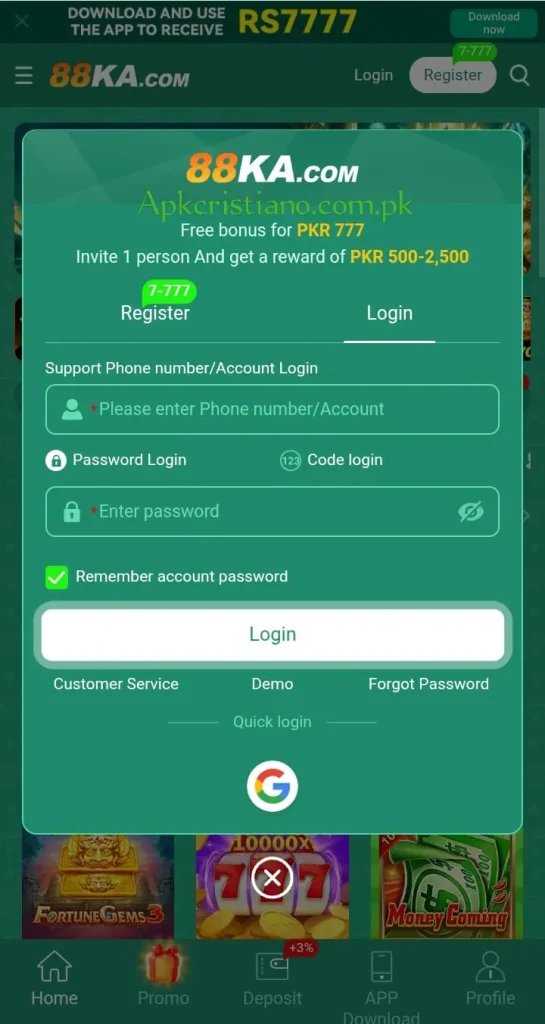
How to Log in to an Account
Step 1: Open the Login Section
Visit the verified website or open the application. Find the Login option on the main screen.
Step 2: Enter Your Registered Details
Provide the username, mobile number, or other account identifier requested by the login form.
Step 3: Type Your Password
Enter the password associated with your account. Check the spelling and character details before continuing.
Step 4: Complete Additional Verification
If additional verification is requested, follow the official instructions. Do not share verification codes with unknown individuals.
Step 5: Check Your Login Information
Review the entered details to make sure everything is correct. Incorrect credentials may prevent access to the account.
Step 6: Access Your Account
Submit the login form and continue if the information is accepted. If access fails, use the official recovery process instead of contacting unofficial agents.
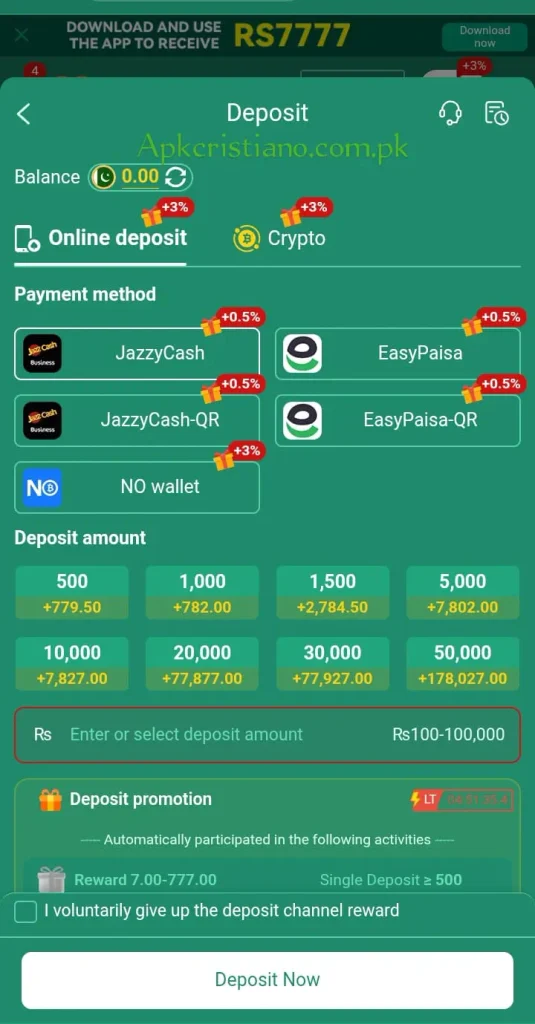
Deposit and Withdrawal on 88KA Game
Payment-related information should be checked carefully before users consider making any transaction. The availability of deposit and withdrawal services, payment methods, and transaction limits must be confirmed through a legitimate source.
Deposit Process
Step 1: Open the Account Wallet
If a verified platform provides a wallet section, log in and locate the relevant payment area.
Step 2: Select the Deposit Option
Choose the deposit option, if available, and review the displayed payment instructions.
Step 3: Check Payment Methods
Look at the listed methods and confirm whether they are officially supported. Do not rely on unofficial payment agents.
Step 4: Review Transaction Limits
Check the minimum and maximum limits, applicable charges, and any other conditions before proceeding.
Step 5: Verify Payment Details
Carefully check the recipient information before making any financial transaction. Avoid sending money to unknown personal accounts.
Step 6: Keep the Transaction Record
Save your payment receipt and any confirmation details. These records may be useful if you need to review a transaction later.
Withdrawal Process
Step 1: Open the Withdrawal Section
If withdrawals are supported, access the account wallet and find the relevant option.
Step 2: Review Available Methods
Check which withdrawal methods are officially listed. Confirm that the payment details belong to a verified recipient.
Step 3: Check Withdrawal Conditions
Review the minimum amount, maximum limit, verification requirements, and other applicable terms.
Step 4: Enter the Required Details
Provide the necessary information carefully. Make sure the details are accurate before submitting a request.
Step 5: Review Your Request
Check the requested amount and payment information one more time. Avoid submitting a request if the conditions are unclear.
Step 6: Save Confirmation Information
Keep a record of the request and any confirmation message. Processing times and approval are not guaranteed.
Bonuses and Promotional Offers on 88KA Game
Promotional offers can appear on online gaming platforms to inform users about campaigns and special activities. Their availability and conditions should always be verified.
Welcome Offers
Some platforms advertise special offers for newly registered users. These promotions may have eligibility requirements and specific terms. Read the complete conditions before accepting any welcome reward.
Daily Promotions
Daily promotional announcements may appear through banners or account notifications. Their availability can change depending on the operator. Users should check the expiry date and other restrictions.
Referral Promotions
Referral campaigns may encourage existing users to share a platform with others. Such offers can involve specific registration or activity requirements. Avoid sending promotional links to people without explaining their associated risks.
Special Event Offers
Some platforms may introduce campaigns during special occasions or events. These promotions can have limited availability and separate rules. Always verify the information through an official source.
Loyalty Rewards
Loyalty programs may be advertised as a way to recognize regular users. However, their actual benefits and eligibility requirements can differ. Do not assume that participation guarantees any financial reward.
Promotional Terms and Conditions
Every promotional offer should be reviewed carefully before acceptance. Check the expiry date, eligibility rules, wagering requirements if applicable, and withdrawal restrictions. Avoid offers that make unrealistic promises or require unexplained payments.
User Interface and Mobile Experience of 88KA Game
A platform’s interface plays an important role in how users explore its different sections. Clear menus, readable text, and organized account options can make browsing easier for beginners. Users should check the actual interface before relying on advertised descriptions.
Mobile compatibility is another important consideration for smartphone users. An application should work properly with the supported Android version and should not request unnecessary device permissions. A stable internet connection and an updated operating system can also improve general browsing performance.
Security, Privacy and Legal Considerations for 88KA Game
Online safety should remain a priority whenever users explore unfamiliar applications or websites.
1. Verify the Application Source
Always check the developer and download source before installing an APK. Avoid files distributed through suspicious websites or unknown messages.
2. Protect Personal Information
Only provide information that is genuinely required by a verified platform. Avoid sharing passwords, OTPs, and sensitive financial details with other people.
3. Review Privacy Policies
Read the privacy policy to understand how personal information may be collected, stored, and used. Be cautious if important privacy information is missing.
4. Understand Financial Risks
Money-based gaming can result in financial losses. Never spend money that you cannot afford to lose, and do not treat gaming as a dependable income source.
5. Follow Applicable Laws
Check the local laws and regulations that apply to online gaming in your location. Only adults should consider age-restricted gaming activities.
Pros and Cons of 88KA Game
The following table highlights general points users should consider when evaluating the platform.
| Pros | Cons |
| Mobile access may be convenient | Official application details need verification |
| Account-based features may be available | Actual features may vary |
| Different gaming sections may be offered | Payment methods require confirmation |
| Simple navigation may help beginners | Financial risks may be involved |
| Promotional information may be displayed | Offers can include restrictions |
| Online access may be convenient | Operator legitimacy must be checked |
Common Problems and Solutions on 88KA Game
Users exploring online applications may sometimes experience technical or account-related problems. Here are six common issues and general ways to understand them.
| Common Problem | Possible Solution |
| Application Not Installing | Check device compatibility and verify the APK source |
| Login Error | Review your credentials and use official recovery options |
| Slow Loading | Check your internet connection and restart the application |
| Verification Issue | Follow the official verification instructions |
| Payment Problem | Check transaction records and contact verified support |
| Application Crashing | Update your device and check the application’s compatibility |
Final Thoughts on 88KA Game
88KA Game is a name that users may encounter while searching for online gaming and mobile entertainment options. Before exploring it, beginners should understand its available features, account requirements, and general working process. The download source, developer identity, payment options, and privacy information should be verified carefully. Users should also read promotional conditions instead of relying on advertisements or unrealistic earning claims. Online gaming involves risks, so responsible decisions are always important. Check the applicable local laws and protect your personal and financial information before using any unfamiliar platform.
FAQs About 88KA Game
1. What Is 88KA Game?
It is a name associated with online gaming searches and mobile entertainment. Users should verify its actual features and operator details before accessing it.
2. How Can I Download 88KA Game?
If a genuine Android APK is available, users should obtain it through a verified source and check its developer information before installation.
3. How Do I Register and Log In?
If account registration is supported, users can follow the verified registration form, create a secure password, complete any required verification, and use their credentials to log in.
4. Does 88KA Game Support JazzCash and Easypaisa?
The availability of these payment methods has not been independently confirmed. Check the verified payment section before considering any transaction.
5. Is 88KA Game Safe?
Its security and operator identity should be independently checked. Review the application source, privacy policy, developer information, and requested permissions before sharing personal details.
6. Can Users Earn Guaranteed Money?
No online gaming platform should be considered a guaranteed source of income. Money-based gaming involves financial risks, and users may lose the money they spend.